Typical cloud AI
Rented intelligence.
- Your prompts are processed on someone else’s servers
- No signal, no answers
- Account, sign-in and a monthly subscription
- One vendor-controlled model
- Trust is “read our privacy policy”
LokalMind runs open-weight AI models directly on your iPhone. Chat on a plane, in a basement, anywhere — your conversations never leave your device.
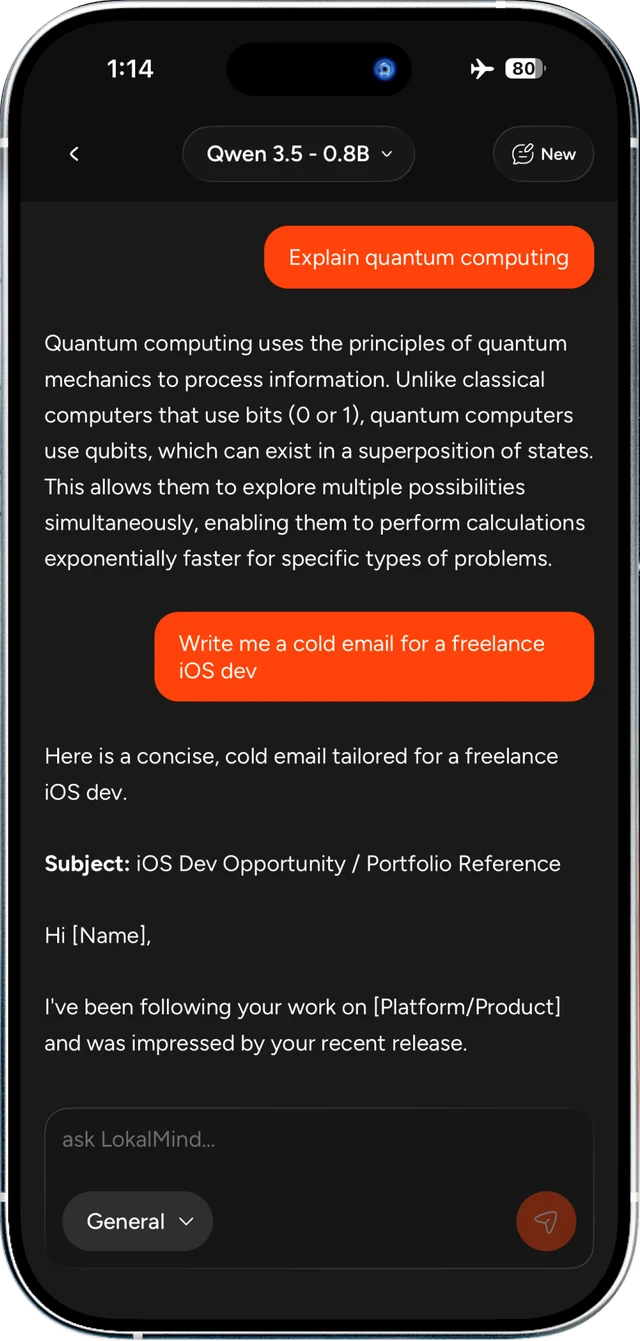
LokalMind flips the model. The AI lives on your phone, answers are generated on your phone’s chip, and nothing is transmitted anywhere. Privacy isn’t a policy page — it’s the architecture.
Rented intelligence.
Intelligence you own.
Everything you expect from a modern chat app — streaming answers, memory, modes, search — rebuilt to run locally with a premium, native iOS feel.
Tokens stream in live with haptic feedback. Stop mid-answer, switch models from the chat header, and keep going.
Pinned facts, a learned profile and cross-session memories — retrieved with on-device semantic search.
Switch between General, Coding, Creative and Marketing — and rewrite the system prompt for each one.
Keep typing while the model answers. Queued messages sit in a strip — edit or remove them before they send.
Large models download in the background — pause, resume and cancel without starting over.
Long-press any message you sent to fix it. The thread rewinds from that point and the assistant regenerates from your corrected text.
Markdown rendering with language-labelled code blocks and one-tap copy. Chain-of-thought is tucked away so you read the answer first.
Find old threads across chat titles and message text. Auto-titles keep your recents tidy.
Onboarding matches models to your device’s RAM, so you never download something that can’t run.
Wipe every chat, memory, setting and model from the device. A true clean slate.
Dark, glass-style surfaces, native tab bar, haptics on the moments that matter. Not a web wrapper — a real iPhone app.
Download LokalMind from the App Store. No sign-up, no email, no account — just your name, if you like.
Choose an open-weight model sized for your iPhone’s memory. It downloads once and lives on your device.
Flip on airplane mode if you want. Every answer is generated locally, and every chat stays on your phone.
A curated catalog of open-weight GGUF models from Qwen, DeepSeek and Google. Small ones for speed, bigger ones for depth — switch any time.
Blazing-fast everyday chat with thinking mode built in. The perfect first model.
The balance of speed and intelligence. Strong at summaries and multilingual chat.
Thinks before it answers. Built for coding, math and step-by-step logic.
More headroom for complex tasks, long-form writing and creative work.
Thinking mode for harder problems — a strong pick for coding sessions.
Long context and careful analysis. Great for working through documents and ideas.
Tip: start with Qwen 3.5 0.8B for speed, then step up to a 4B model when you need deeper reasoning.
No accounts. No tracking. No ads. No cloud inference. Your conversations are stored locally, processed locally, and deleted locally.
Read the full privacy policy — it’s short, because there isn’t much to say.
LokalMind is MIT-licensed and built in public. Every line that touches your data is on GitHub — audit it, fork it, or send a pull request.
Expo and React Native with llama.cpp inference via llama.rn, SQLite storage and a Clean Architecture core — domain logic with zero third-party imports.
LokalMind is an independent project — no corporation, no investors, no data business. If it’s useful to you, a star or a coffee genuinely keeps it going.
Hold-to-talk with on-device Whisper speech recognition.
Share any conversation as PDF or Markdown.
Reminders and Calendar, handled locally via EventKit.
The same private AI, on the other half of the world’s phones.
No. Once a model is downloaded, LokalMind works completely offline. The internet is only used to download models and receive app updates.
Everything — chats, memories, settings and models — lives in local storage on your iPhone. Nothing is sent to any server, and there’s no account to sync it to.
LokalMind checks your device’s memory during setup and recommends models that fit. Small models like Qwen 3.5 0.8B run on phones with 2 GB+ of RAM; 4B models want 4 GB or more.
Surprisingly capable for everyday writing, summaries, brainstorming, coding help and reasoning. They won’t match the largest frontier models in the cloud — LokalMind trades a bit of raw power for complete privacy and offline access.
Larger 4B models need more RAM and compute. Try a smaller model like Qwen 3.5 0.8B for faster responses on older devices.
Profile → Erase All Data. This wipes all chats, settings, memories and downloaded models from your device and returns you to onboarding.

Free on the App Store. No account. No cloud. Just you and a model that lives on your phone.


